A WBS workspace for teams tired of spreadsheets

More structured than spreadsheets.Lighter than MS Project.

Structure the work as a WBS — the Gantt, CPM schedule, baselines, SPI, sharing and reports follow.
Have an invite code? Sign up now →
wbsgantt
wbsgantt — WBS tree and Gantt side by side, dependencies and critical path visible
PMBOK®-standard structure & terms100% Rule checked automaticallyCPM critical path, computed for youAI-ready via MCP
Sound familiar?

Still working like this?

01 Create
A blank page, and no idea where to start breaking the work down.
02 Edit
Insert one task and the numbers, dates and links all fall apart.
03 Share
You email the file, and now there are five different versions.
04 Sync
You build the WBS in Excel, then rebuild it as a Gantt. Twice the work.
05 Report
The Gantt lives on screen, the weekly report in Excel — same numbers, built twice.
06 Risk
The schedule is slipping right now — and you find out after the deadline.
Pain → Solution

Keep one WBS alive, and everything else follows.

01Create
The painA blank page, no guide for where or how far to break the work down.

Start from a template, not a blank page.

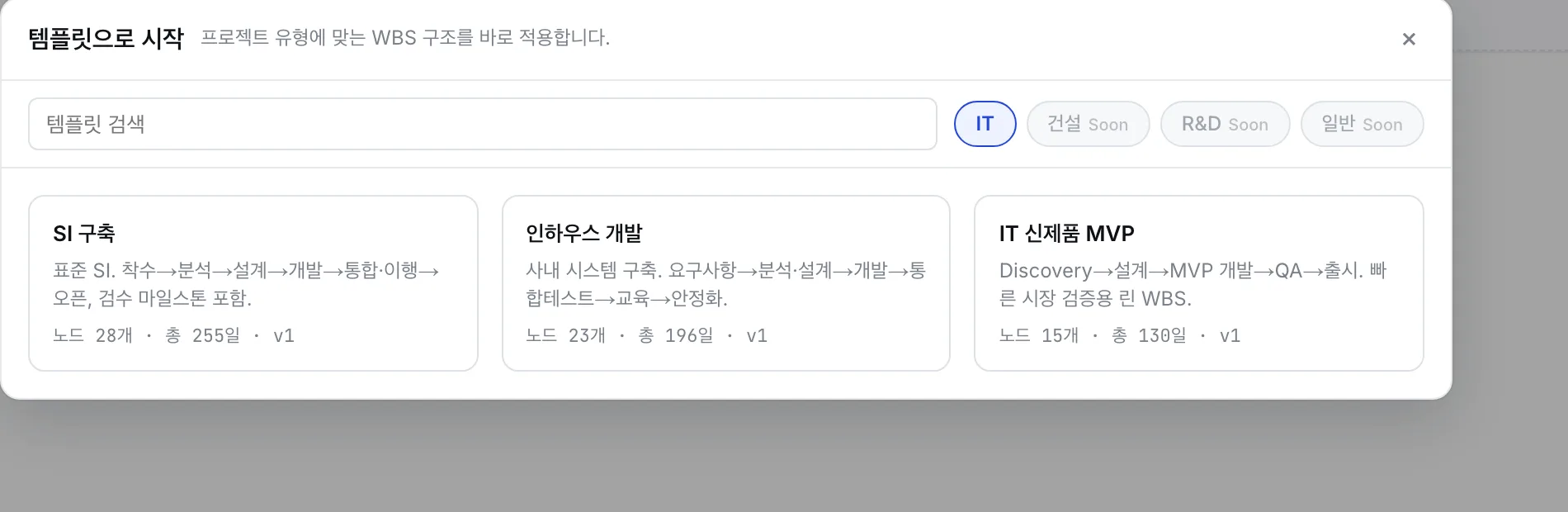
Pick an industry template (IT, construction, general…) in Korean or English, and the 100% Rule guides you as you break the work down — the first draft is fast and standards-clean.

wbsgantt
Template gallery — pick an industry WBS template in Korean or English
02Edit
The painInsert one task and the numbers, dates and dependencies all fall apart.

Insert anywhere — it re-flows itself.

Drag a node in or out and WBS codes, weights and the 100% Rule check all update automatically. Weights redistribute across siblings — no renumbering by hand.

Drag to insert — auto re-flow
Before
2.1Requirements
2.2Architecture
2.3Data model
After insert
2.1Requirements
2.2API contractNEW
2.3Architecture
2.4Data model
Codes renumberedDates shiftedDependencies kept100% Rule ✓
03Sync
The painYou build the WBS in Excel, then rebuild it as a Gantt. Twice the work.

Build once. It’s already a Gantt.

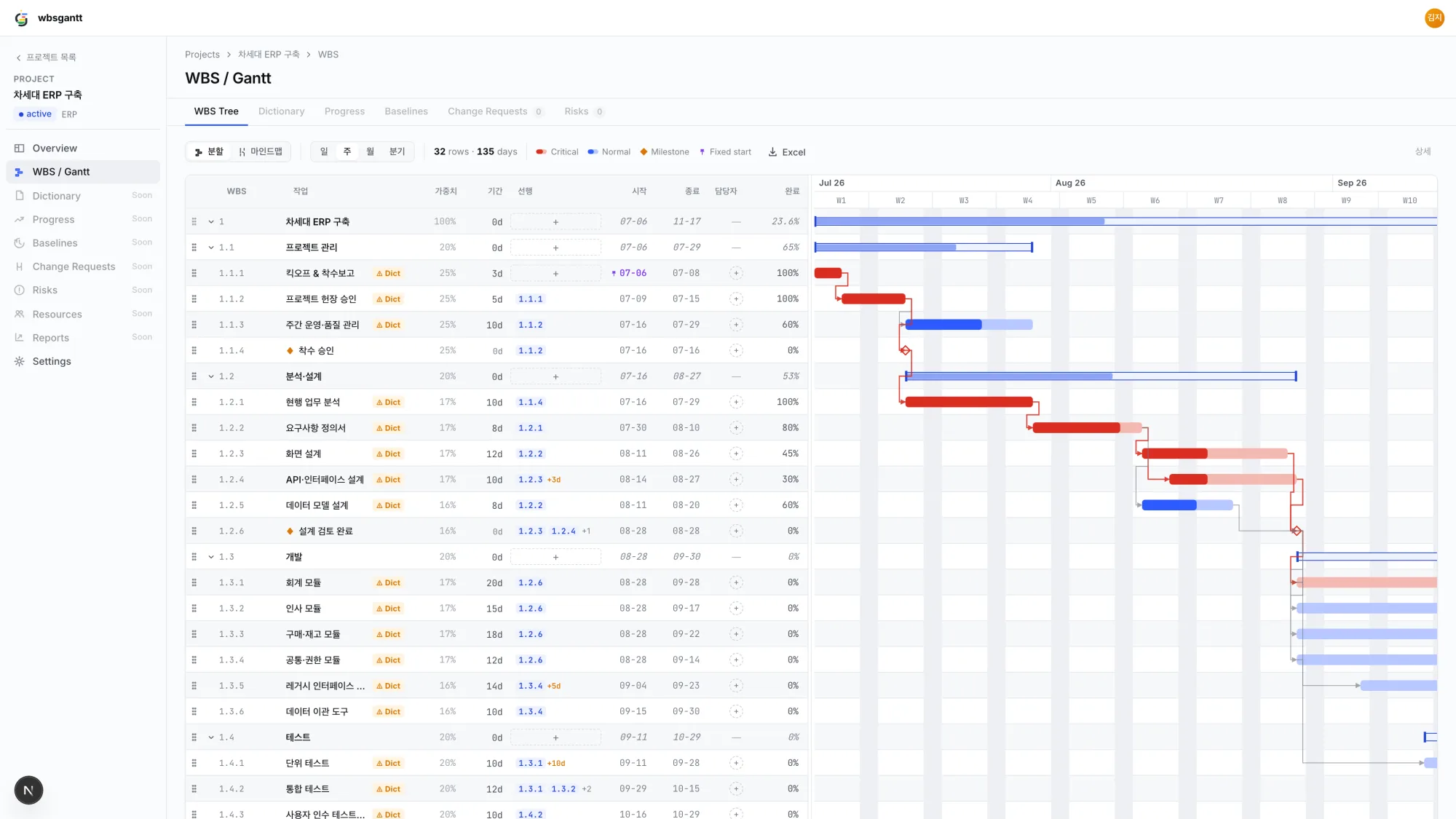
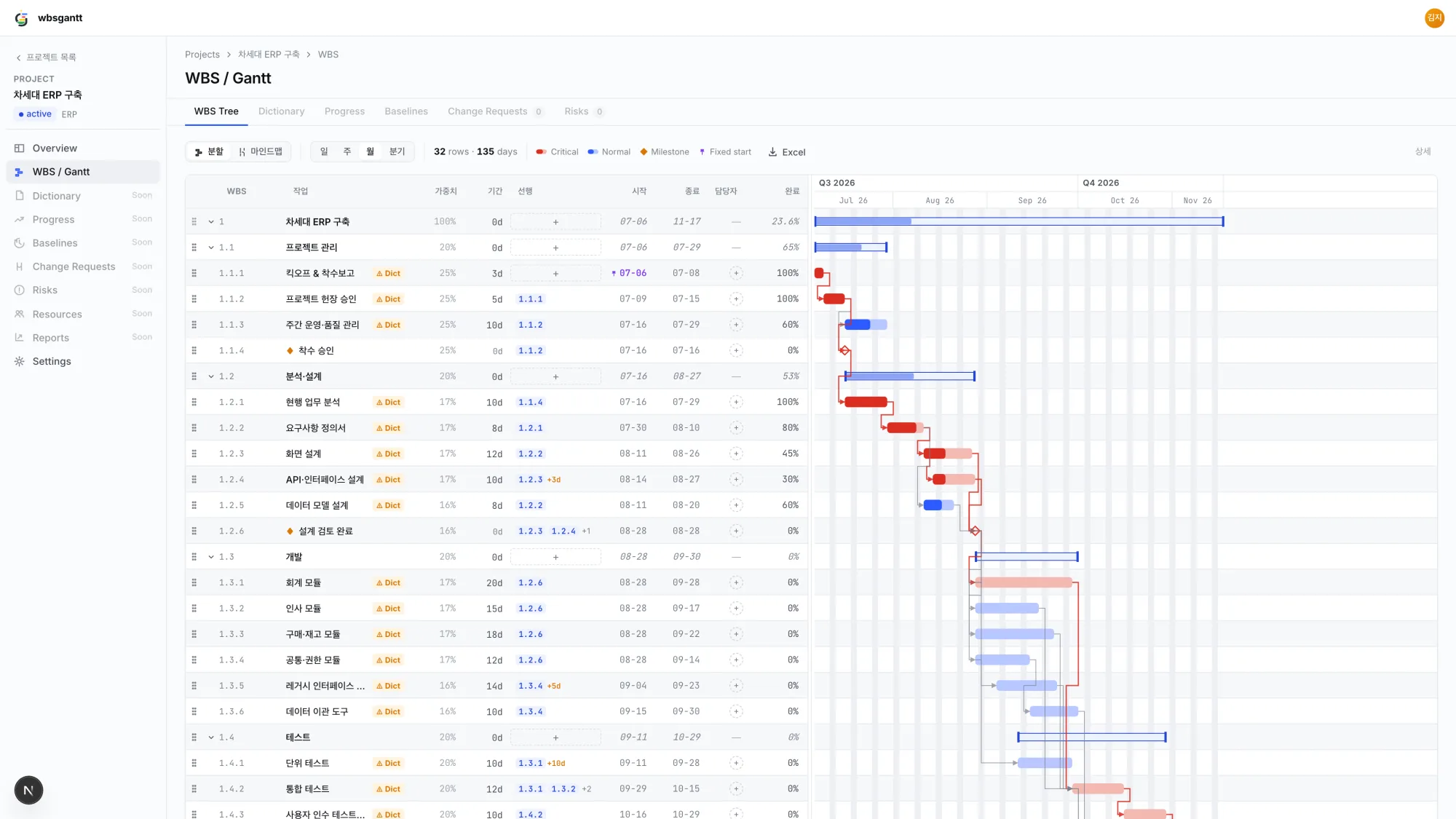
The WBS tree and Gantt share one data model. Link dependencies (FS·SS·FF·SF, lead/lag) and CPM computes the schedule and highlights the critical path — on working days, Korean public holidays included.
wbsgantt
WBS tree with the Gantt beside it — CPM critical path highlighted in red
04Share
The painYou email the file, and now there are five different versions.

One link. Always the latest plan.

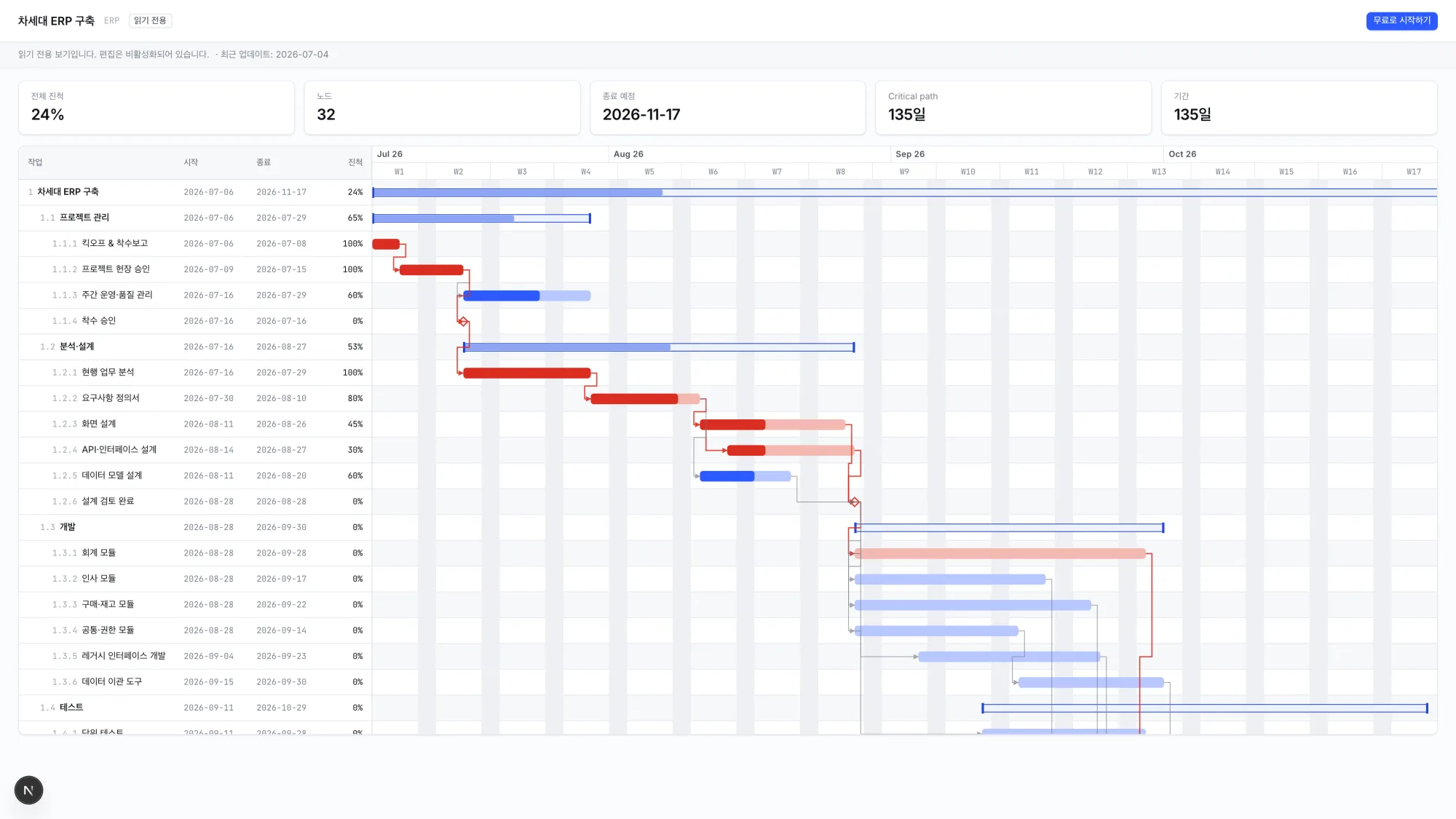
Invite members with roles, or hand stakeholders a read-only share link (PIN optional) — no account needed. Everyone sees the same live plan in the browser.
wbsgantt
Read-only share view — stakeholders see the live plan without an account
05Report
The painThe Gantt lives on screen, the weekly report in Excel — built twice.

Reports are one click away.

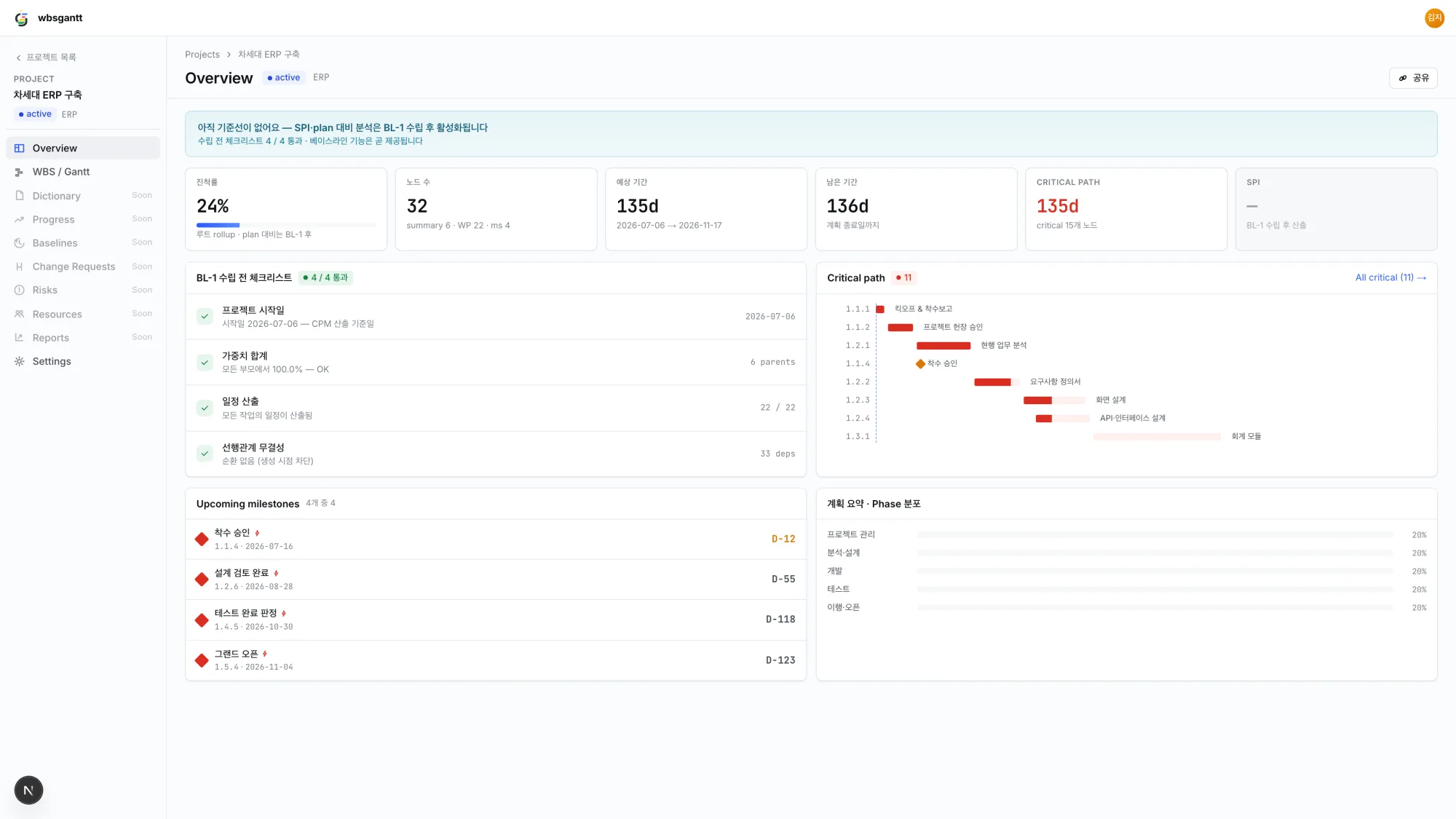
Enter progress on work packages and it rolls up the tree. The overview dashboard tracks milestones and the critical path, and the whole WBS exports to Excel — cover page and weekly/monthly report sheets included, in Korean or English.
wbsgantt
Overview dashboard — progress, milestones and critical path at a glance
06Baseline
The painThe plan keeps moving, and nobody remembers what was approved.

Lock the plan. See the drift.

Set a baseline the moment the plan is approved. The Gantt overlays baseline bars under the current schedule and the overview shows the variance — so “are we off plan?” finally has an answer.

Gantt — baseline overlay
BL-1 · set at approvalbaseline ▬ · current ▮
2.1 Requirements
2.2 Architecture
+3d
3.1 API build
+4d
3.2 UI build
Immutable snapshotOverlay toggleΔ in Overview
07Risk
The painThe schedule is slipping right now — and you find out after the deadline.

See the risk before it reaches the deadline.

Your progress data becomes a live SPI, an S-curve of planned vs earned value, and a top-delay list of the work packages dragging the schedule — refreshed daily against the baseline.

Overview — schedule performance
SPI
0.87
EV 52% / PV 60%
S-CurvePV · EV
Top delay — vs baseline
3.1API build−4d
2.2Architecture−3d
AI × MCP

Your AI assistant is a team member now.

Connect Claude, ChatGPT or any MCP client to wbsgantt. The AI reads, drafts and edits your WBS in conversation — you stay the PM who approves.

Draft a WBS from this kickoff meeting note.
import_wbs_project · 24 nodes created
Done — 4 phases, 18 work packages, 2 milestones. Design starts after requirements sign-off (FS).
Real tools, not a demo script — the server enforces WBS rules on every AI edit.
Meeting note → whole WBS
Paste requirements or meeting notes and the AI creates the full project draft in one call.
One sentence → dependencies
“API design starts only after screen design finishes” — the AI wires the FS link for you.
Dictionary drafts
Definitions, deliverables and acceptance criteria drafted per work package — you review and confirm.
Connect in 3 steps — nothing to install
  1. Issue an API token in Account settings (read-only or read+write).
  2. Add https://api.wbsgantt.com/mcp/ and the token to your MCP client.
  3. Start chatting — “show me my wbsgantt projects”.
Connection guide on GitHub

Server-side guardrails: dependency cycles blocked, milestones stay zero-duration, the 100% Rule checked. Tokens expire in 90 days and can be revoked anytime.

What you get today

Everything below ships today. No asterisks.
WBS tree
Drag & drop, context menu, convert/duplicate/move.
Native Gantt
Dependency arrows, zoom, weekend shading, progress bars.
WBS Map (mind map)
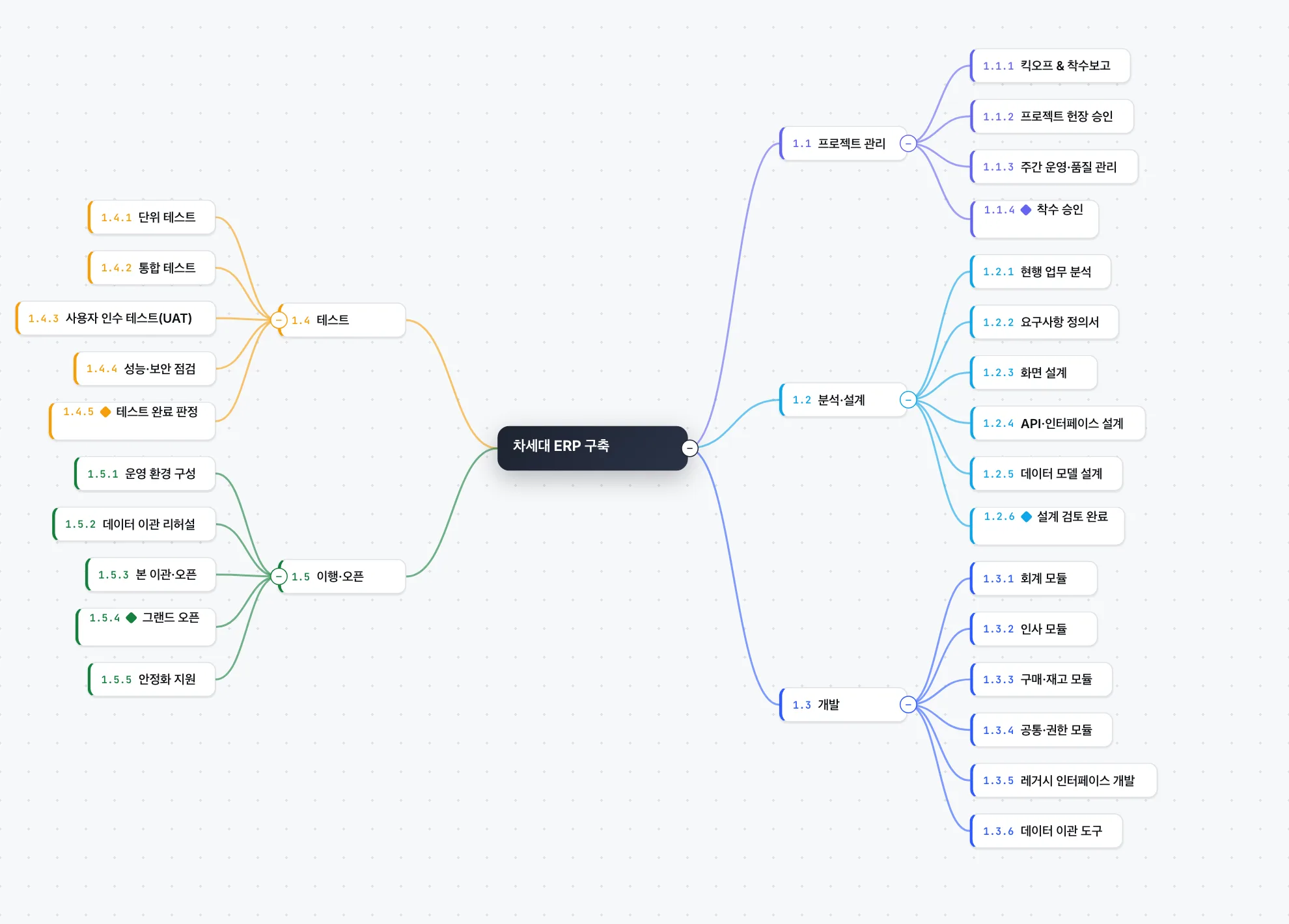
A third, radial view of the same tree.
100% Rule & weights
Sibling weights auto-distribute; violations get flagged.
CPM & critical path
Forward/backward pass, float, critical path highlighted.
Dependencies
FS·SS·FF·SF with lead/lag, cycles blocked.
Working-day calendar
Korean public holidays built in — working days editable per project.
Progress roll-up
Enter progress on leaves; parents roll up by weight.
Baseline & variance
Lock the approved plan; compare via Gantt overlay and overview Δ.
Earned value (SPI)
Live SPI, S-curve and top-delay cards from daily snapshots.
Overview dashboard
Progress, milestones, critical path and delays on one screen.
WBS Dictionary
Definition, deliverables, acceptance criteria per node.
Excel export
One-click .xlsx — cover page, WBS, weekly/monthly report sheets, ko/en.
Read-only share links
No-account viewing for stakeholders, PIN optional.
Members & invitations
Roles from owner to read-only viewer; invite by email before sign-up.
AI editing via MCP
Claude & ChatGPT read and edit the WBS — server-side guardrails.
On the roadmapWe only mark things “available” when they ship. These are next:
Soon
Comments & mentions
Discuss right on the node.
Soon
Live presence
See who’s viewing and editing.
Soon
Built-in AI drafts
AI-drafted WBS inside the app, labeled as drafts.
See a real project — no sign-up.
A read-only share link to a live sample project — the schedule, dependencies and critical path, exactly as members see them.
Open the live demo
wbsgantt
WBS Map — the same tree as a radial mind map
How it works

From blank page to a working schedule in minutes.

1
Pick a template — or start from scratch.
2
Break the work down. Codes, weights and the 100% Rule keep up automatically.
3
Link dependencies — CPM computes the schedule and shows the critical path.
4
Lock a baseline — variance and SPI track against the approved plan.
Compare

Why teams switch to wbsgantt

MS ProjectPrimaveraJirawbsgantt
WBS standard validation
Native Gantt
CPM critical path
AI editing via MCP
No install
Read-only share links
Korean holiday calendar
Baselines
Schedule EVM (SPI)
Real-time collaborationSoon

“Soon” means on our roadmap — we don’t claim it before it ships.

FAQ

Questions PMs actually ask

Where is my data stored?

In a PostgreSQL database on AWS (Seoul region). Every project belongs to your organization (tenant) and is isolated per tenant.

How is this different from Excel?

Excel holds numbers; wbsgantt holds structure. Codes renumber themselves, weights keep the 100% Rule, dependencies drive a CPM schedule — none of which a spreadsheet checks for you.

Can AI build my WBS?

Yes — connect Claude or ChatGPT via MCP and the AI can create a whole project from a document, edit nodes, wire dependencies and draft dictionaries. Setup guide: github.com/humhon-labs/wbsgantt-mcp.

Can I import MS Project files?

Not yet — XLSX/MPP import is on the roadmap. Today you can export the whole WBS to Excel, and create projects from documents via the AI (MCP) route.

Which languages are supported?

The whole app ships in Korean and English — templates, Excel exports and this site included. PMBOK terms stay in standard English in both.

Is it free? How do I get in?

Free during the private beta. Request access with the beta form, or sign up right away if you have an invite code. The live demo needs no account at all.