We Wrecked the Whole Plan. Undo Wasn't Enough
Pinned BL-2 as a checkpoint right before a risky edit, then rolled a plan — a whole phase wiped out by one accident — back to the snapshot: auto backup, progress preserved, all-or-nothing.
The last three installments were a trilogy. A risk grabbed an ankle (Part 9), SPI dragged the delay into the open as a number (Part 10), the change history kept the record of the response, and the dependency graph computed where the delay would land (Part 12). Four screens answered one question: when plan and reality diverge, what do you base the next decision on?
Everything that trilogy dealt with was delay that came from the outside. Legacy data misbehaved, migration ran late, one missing dependency line set off a domino chain. The PM didn't do anything wrong — reality pushed the plan around. This installment looks the other way: the accident that comes from the inside. The moment when, editing the plan, the PM breaks it badly with their own hands.
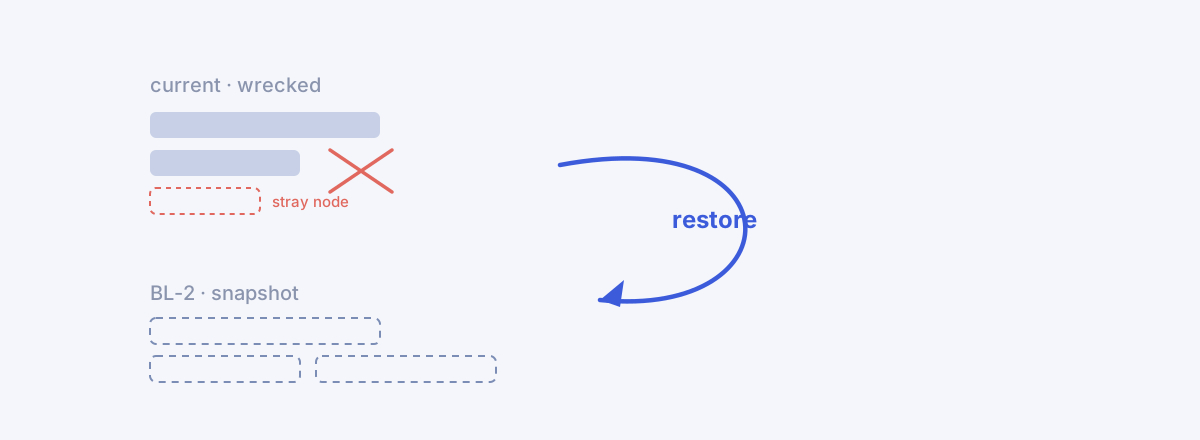
A plan in execution is not a dead document. You touch it every week — extend a duration, rewire a dependency, reshuffle a phase. Most of it is small. Then one day an edit goes badly wrong: a whole phase deleted by mistake, or a restructuring that tangles the tree. ⌘Z (undo) reverses one move. But for a disaster where ten edits are snarled together, stepping back one move at a time isn't enough. What you need is a snapshot that rolls the entire plan back to a saved point.
As always: this is a lab report, not an ad. What works and what doesn't, written down as-is. And one more thing — the screens in this demo are not the Korean project from the earlier installments but a separate ERP-build replica whose WBS reads entirely in English (MFG-ERP Next-Gen Build). That's why the capture language differs. The nature of the stage is the same.
The stage — 42 nodes, and a BL-1 already in place
The stage is a six-month manufacturing ERP build: 42 nodes — 12 summaries, 29 work packages, 1 milestone — 36 dependencies, and a final milestone called "System Go-Live." A BL-1 that froze the plan at kickoff is already in place — the original we called out in Part 3, where your schedule didn't slip, your baseline disappeared.
So far this is the two faces of the baseline we saw in the trilogy: the memory of the original ([Part 3]) and the measuring stick (the denominator behind SPI in [Part 10]). This installment brings out a third face — the restore point.
The checkpoint — pin one more reference right before a risky edit
Now we're about to make a big change. We want to reshuffle the module structure, and edits like that go badly when they go badly. So before touching anything, we do one thing first: pin a checkpoint.
In Settings ▸ Baseline, hit Re-baseline and BL-2 is created. The label is auto-numbered, and we noted "Checkpoint before scope restructuring" in the memo. BL-1 drops to inactive history and BL-2 becomes active.
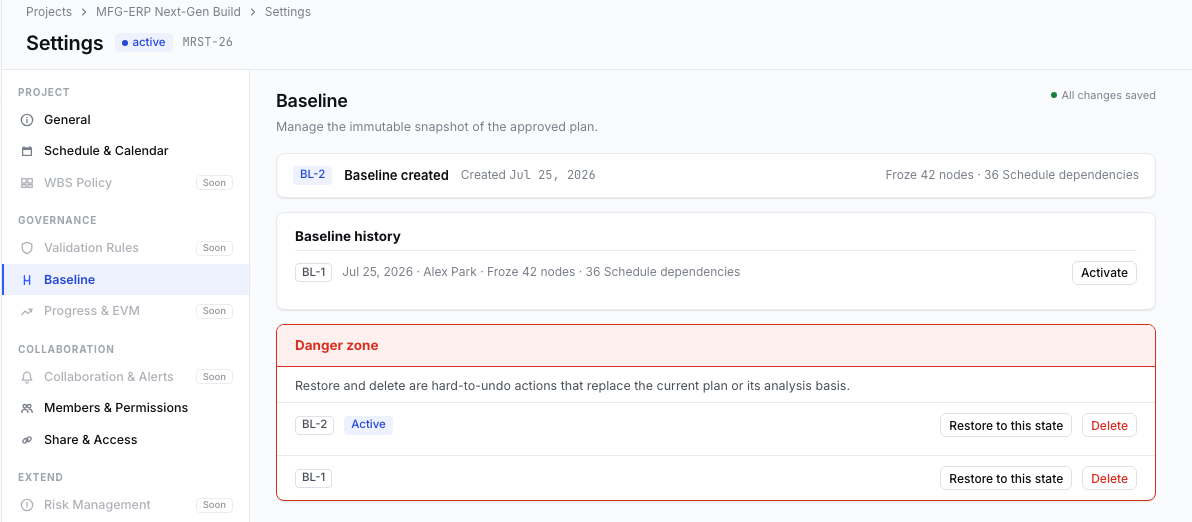
This one screen holds both of the installment's ideas. One is the accumulated baseline — only one is active per project, but the history stacks several (up to ten). Re-planning isn't quietly editing the original; it's establishing a new reference, and that act leaves a record. The other is the Restore to this state button on each history row — the escape hatch that rolls the whole plan back to that snapshot. We don't use it yet. We're about to need it.
The accident — a whole phase vanishes, and something stray creeps in
We start the reshuffle. And here the accident happens. We delete the "Production Module Development" phase — along with its four child work packages — in one stroke. It was a mistake. And while we were in there, a stray node crept into the plan: "Blockchain traceability POC," an item with nothing to do with an ERP build.
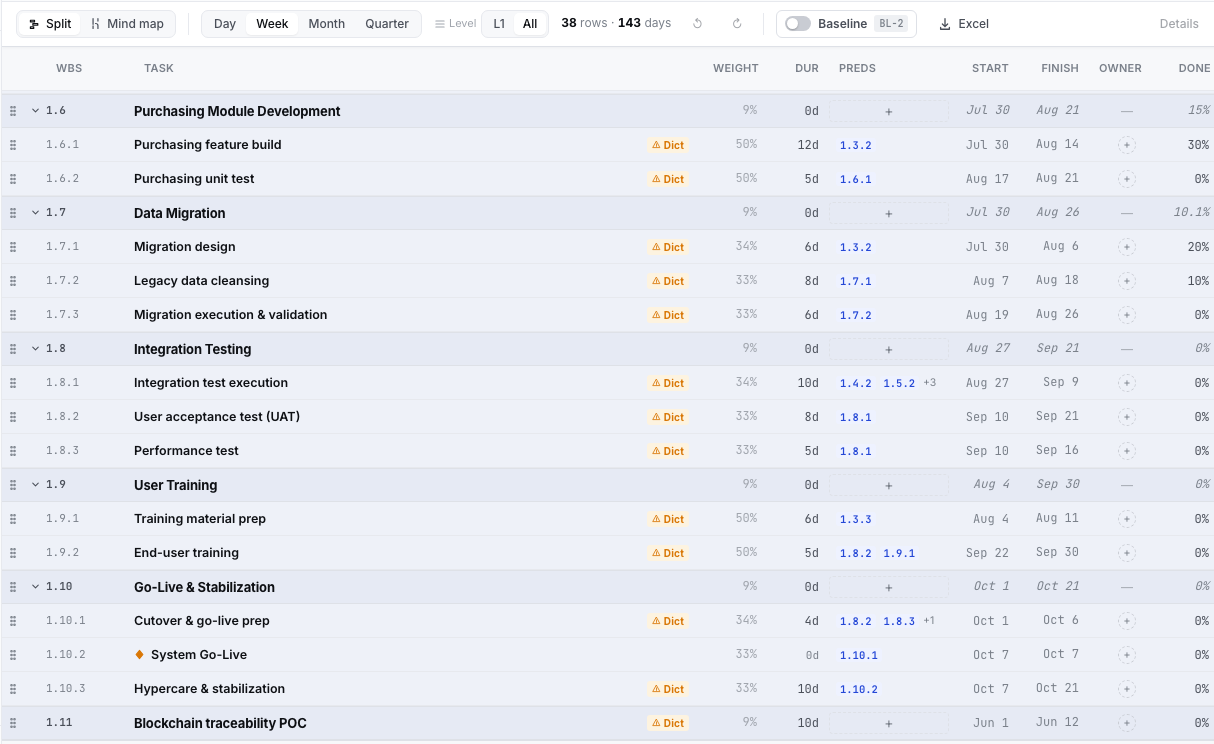
The tree drifted quietly out of true. Forty-two nodes became 38 — five gone, one crept in. The codes renumber automatically, so the missing slot isn't even marked (Purchasing, formerly 1.7, slid up to 1.6). The only thing that catches the eye is the stray item at the bottom; the real loss — an entire module wiped out — barely shows on screen at all. That's what makes the inside accident dangerous. Delay from the outside gets a red SPI warning; a mistake your own hand made gets no warning from anyone.
You could step back one move at a time with ⌘Z. But if a deletion, an addition, and other edits are snarled together, you can't be sure how far back to step to land exactly on that good state. So instead of undo, we restore.
Restore — show what will change first, then ask for confirmation
We hit Restore to this state next to BL-2. Before it runs, a modal appears. This modal is the heart of the installment.
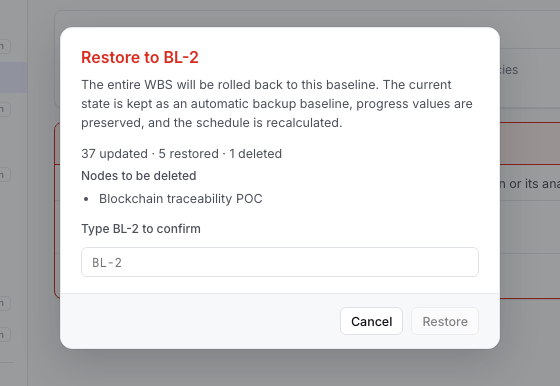
Before rolling back, the modal shows what will change in three numbers first — 37 updated · 5 restored · 1 deleted. That's the snapshot compared against the current tree. Thirty-seven get updated to snapshot values, five are brought back (the deleted Production phase and its four children), one is deleted. The node being deleted is named: Blockchain traceability POC. See with your own eyes what disappears on rollback, then proceed.
The note makes three promises. First, the pre-restore state is kept as an automatic backup baseline — the rollback itself can be rolled back. Second, progress is preserved — rolling back the plan does not erase the actuals the team logged. Third, the schedule is recalculated. And the last gate — "Type BL-2 to confirm." You have to re-type the label by hand before the Restore button opens. Friction deliberately placed in front of a destructive action.
After the rollback — the hole fills in, and the actuals stay
We type BL-2 and press Restore.
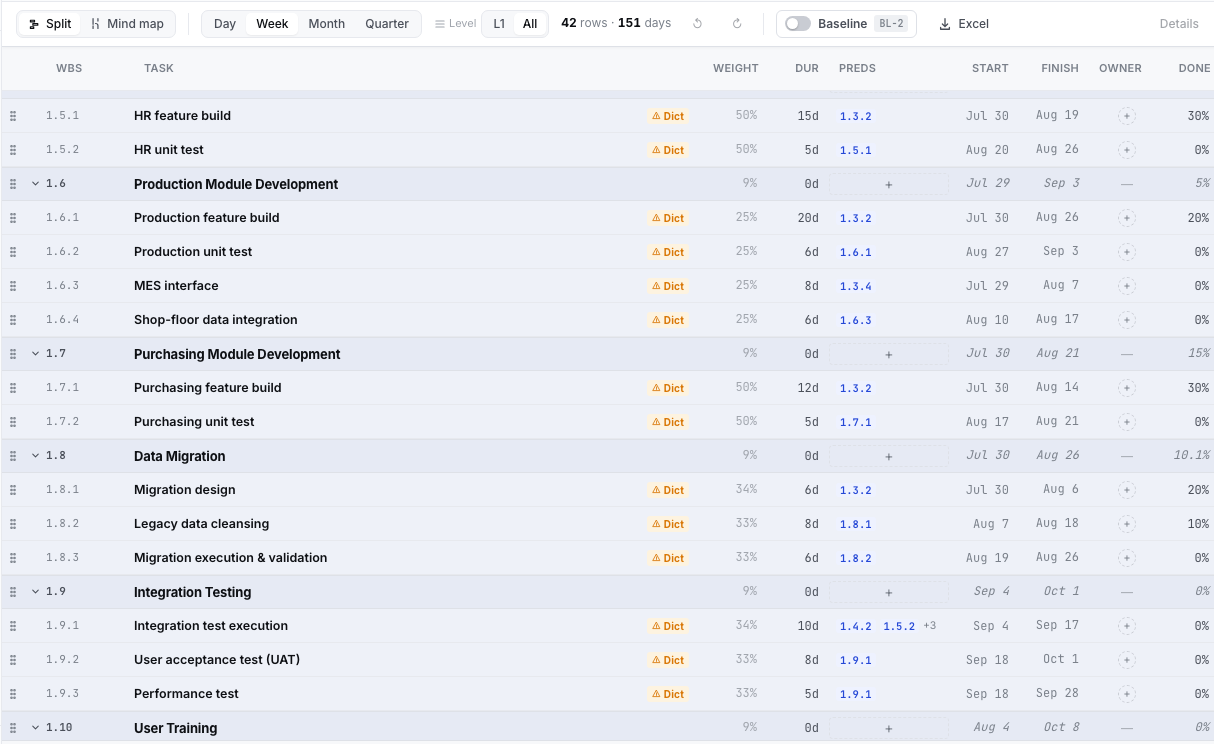
The tree snapped back into place whole. Nodes are 42 again, the missing Production Module Development phase returned with its four children, and the stray Blockchain node is gone. What matters is that the resurrected Production feature build still reads 20%. The plan rolled back to the snapshot, but the actuals the team entered stayed. What the rollback erased was the structural mistake, not the record of work done.
And, as promised, a safety net remained.
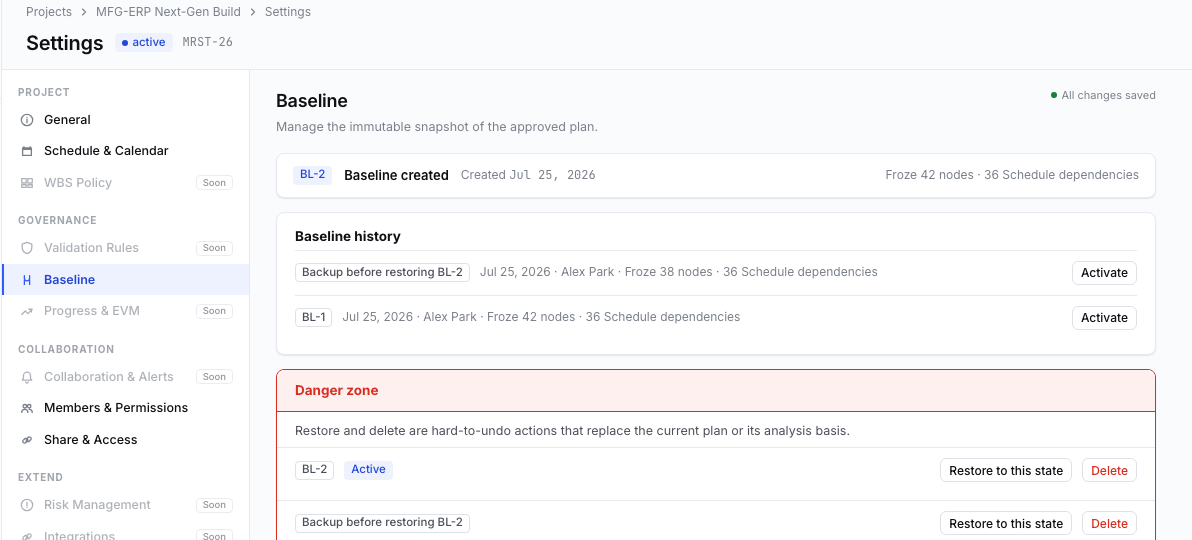
A new row appeared in Baseline history: "Backup before restoring BL-2" — with 38 nodes. Yes: this is a backup holding the wrecked state from moments ago. The reality just before the rollback didn't vanish; it got pinned into history. On the off chance that "actually, there was something worth keeping in those edits," you can roll back to this backup. The rollback left behind one more point you can roll back to.
Honestly — what it doesn't do
Per this series' custom, the misses go on the record too.
- It's all-or-nothing. There is no field-level partial restore — no "roll back the structure but keep the names I changed." Roll back and the good edits since the snapshot come back with it. So the only defense is a habit of pinning checkpoints often, right before big edits.
- Dictionary and comments don't come back. The snapshot holds tree structure, schedule, and dependencies — not WBS Dictionary entries or comments. A resurrected node keeps its dictionary if the values survived on the row at deletion, but the snapshot itself doesn't restore them.
- schedule_mode isn't snapshotted. A node whose auto↔manual mode was changed after the baseline was set won't return to exactly that mode on restore, so its dates can converge differently from the snapshot. A known limitation.
- The automatic backup uses a baseline slot. History caps at ten. Because the backup takes one slot, you must have nine or fewer baselines when you start a restore. If it's full, it stops you and says to delete an old one and retry.
- Progress is not restored. The very thing listed as an upside above is also the boundary. What rolls back is the plan, not the actuals — "take me all the way back to the progress of that moment" is not what this feature does.
Closing
Every delay the trilogy dealt with came from the outside, and what the tool did was surface it in numbers and a red channel. This installment's accident came from the inside, and what the tool did is different — roll the whole thing back to a saved point. Delay was a problem of discovery; a mistake is a problem of recovery.
The three faces of the baseline are all out now. It remembers the plan at kickoff ([Part 3]), measures the variance in execution ([Part 10]), and becomes the point you return to when your hand slips (this installment). All three are different uses of the same immutable snapshot. The reason a "baseline sheet" in Excel can't do all three is that the sheet is editable — the memory gets overwritten, the ruler stretches, and the return point was never there to begin with.
So on your own plan this week, pause once right before you touch a big edit. Have you pinned a point to return to? ⌘Z takes back one move. But on the day you reshuffle a plan in earnest, you don't need undo — you need restore. And restore belongs only to the person who created the return point in advance.