We Bolted a Risk Register onto That ERP Project
On the same ERP project, we identified, assessed, responded to, and monitored eight risks on a 5x5 matrix — a risk pinned to a WBS node rides along every time you look at the plan.
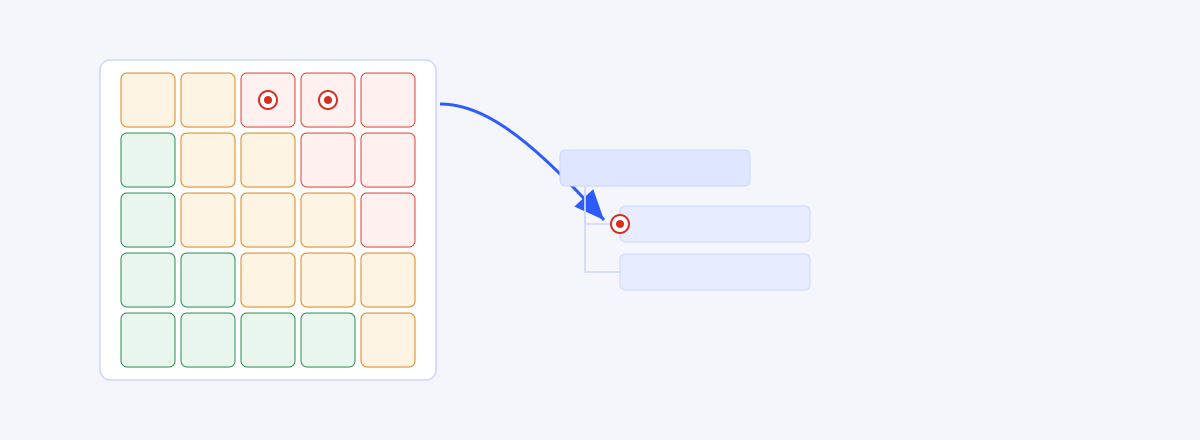
In the last case study we handed Claude an entire six-month manufacturing ERP project and let it build the whole WBS (the previous case study). From the phase skeleton down to data migration and integration testing, a plan stood on the screen. But the moment a plan stands, another question follows right behind it. Where do you write down the things that threaten the plan?
A key developer might quit. Fifteen years of legacy data might be dirtier than expected. Requirements freeze might slip. None of these are work in the WBS — they are the things that can knock the work over. Traditionally a PM records them in a separate "risk log," usually in Excel. And most risk logs are created once at kickoff and never opened again. Being physically split from the WBS, the log stays put when the plan changes, and the plan never hears when the log changes.
This piece is an experiment in deleting that separate spreadsheet. On the same ERP project (code MCG-26), we laid wbsgantt's Risk register over the plan and ran the PMBOK risk process — identify, assess, respond, monitor — inside a single screen. Up front: this is an experiment report, not an advertisement. We'll write down what works and what doesn't, plainly.
Identify — eight risks
First we emptied out the threats already in our heads. Eight of them.
The New Risk dialog is spare. A title, four category buttons (Organizational, Technical, PM, External), and a segmented control to pick Probability and Impact each from 1 to 5. Choose the two values and the Score box below shows the product instantly — press P4, press I5, and 20 · High appears on the spot. As the hint says — "Quick entry — fill in the details after saving" — here you only drop the coordinate; the details come later.
We entered the eight like this.
- Key developer may leave (Organizational) — P4×I5 = 20
- Poor legacy data quality (Technical) — P3×I5 = 15
- Requirements freeze slips (PM) — P4×I3 = 12
- Insufficient parallel-run window (PM) — P3×I4 = 12
- ERP package customization scope creep (Technical) — P3×I3 = 9
- Legacy vendor support ends (External) — P2×I4 = 8
- License cost rises on FX swings (External) — P2×I3 = 6
- Test environment provisioning delay (Organizational) — P2×I2 = 4
Score is the product of Probability and Impact. A simple rule, but the point is that it turns a gut feeling into a coordinate. "The developer leaving scares me most" is now the number 20, and 20 gets compared on one line against the other seven.
Assess — the 5×5 matrix
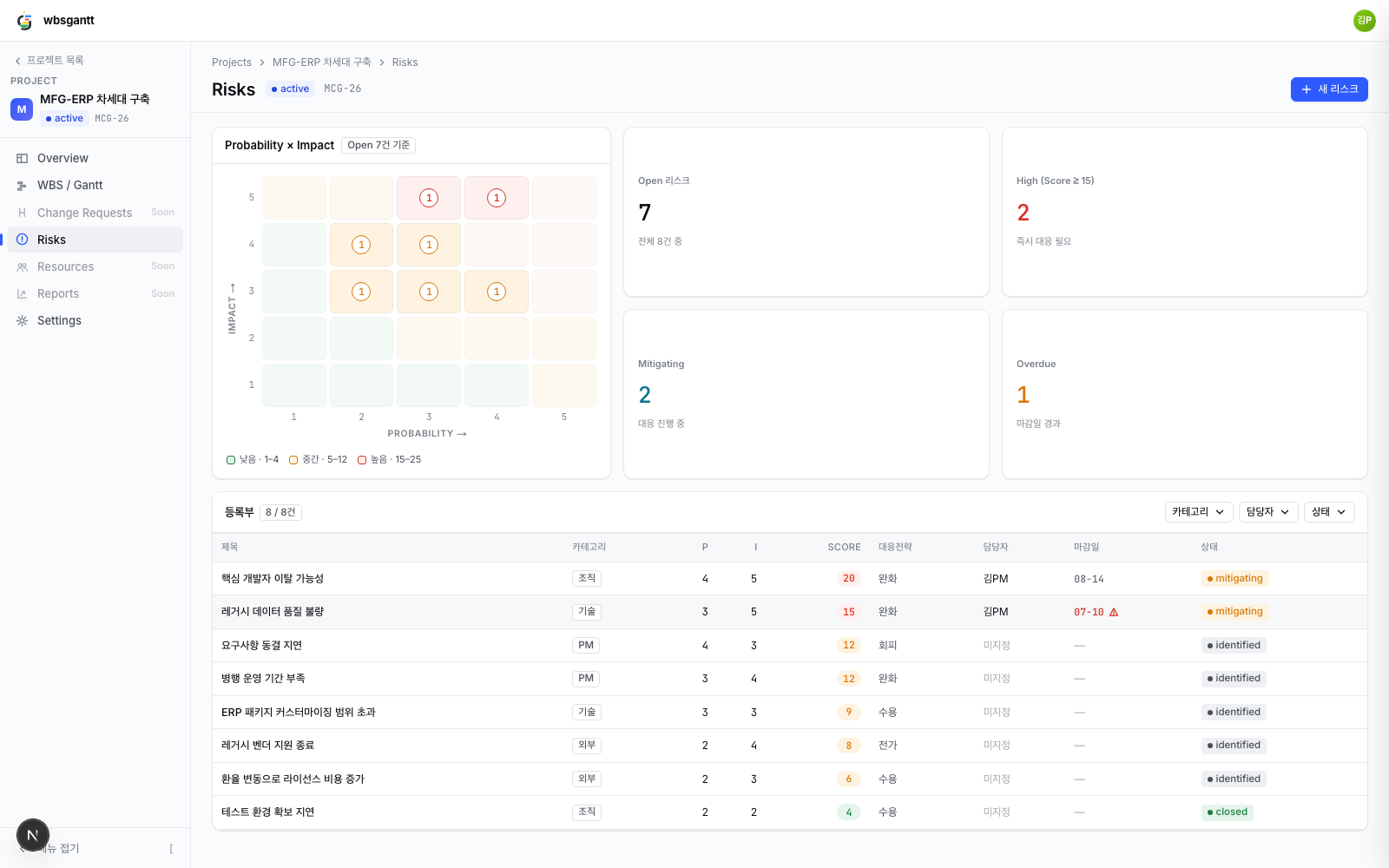
At the top of the register sit four KPI cards — Open 7 · High 2 · Mitigating 2 · Overdue 1. (One of the eight is already closed, so Open is 7.) Below them is the star of this piece, the 5×5 matrix.
The matrix carries an "Open 7" pill and scatters the risks across the Probability × Impact grid. The picture does the talking. The two High risks (Scores 15 and 20) are clustered in the red cells at the top right (3-5 and 4-5). Five cells in the medium band (orange) hold the rest, and the one closed risk doesn't register on the matrix at all. The legend: Low 1–4 · Medium 5–12 · High 15–25.
Why does this matter. Read eight risks as a table only, and "they all look important." The matrix tells you where to start — as a coordinate, not a hunch. Top-right red first. Click a cell and it filters to just the risks at that P×I, so a "highest first, one at a time" meeting rolls forward on its own.
Respond & link — pin it to the plan
We set response strategies from the top right down. Developer attrition (20) got a mitigate strategy, owner Kim (PM), due 8/14. Poor legacy data quality (15) also mitigate, Kim, due 7/10. The rest were spread across avoid, accept, and transfer to fit their nature.
Up to here it's no different from any risk log. The difference is the next step.
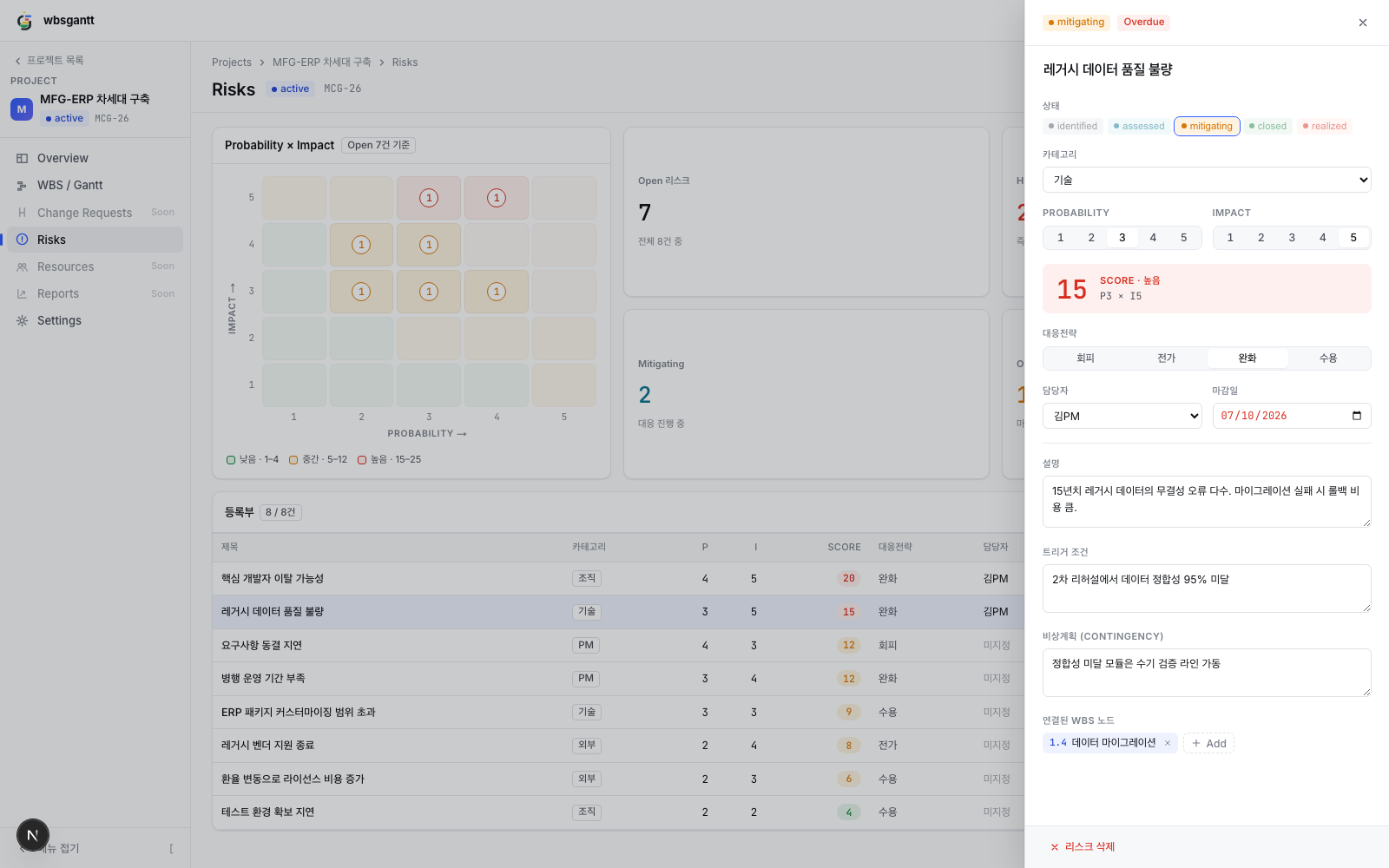
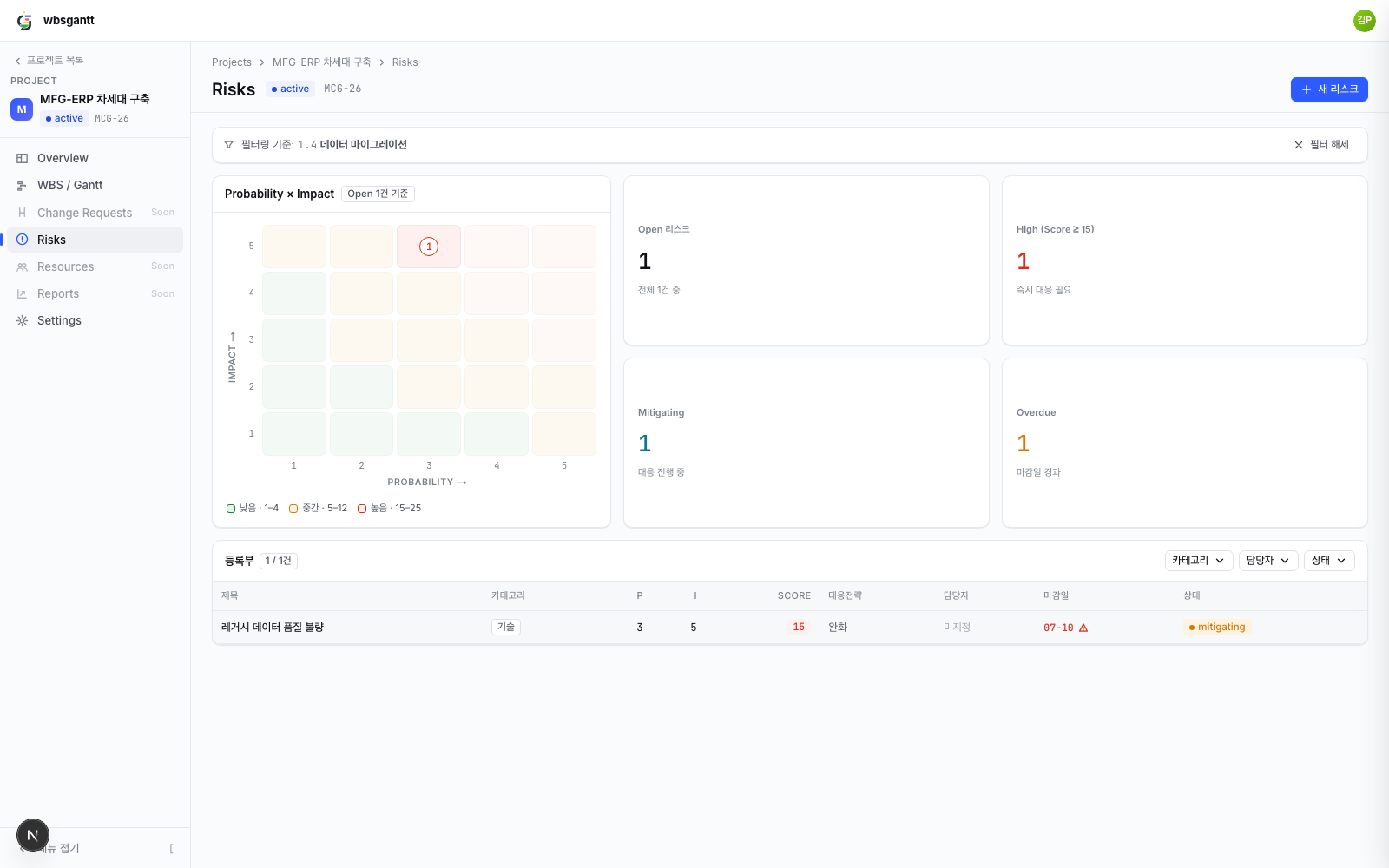
Open a risk and a drawer slides out. The legacy-data-quality risk's drawer shows a mitigating pill and an Overdue pill side by side in the header (the 7/10 due date has passed). The Score box reads 15 · High · P3×I5. Status is picked from five pills (identified · assessed · mitigating · closed · realized), followed by fields for description, trigger condition, and contingency plan — we wrote a trigger ("data consistency below 95% at the second rehearsal") and a contingency ("run a manual verification line for modules that fall short"). There's no save button. Change the P segment and the Score refreshes immediately to the server-recomputed value — it's field-level instant save.
And at the bottom of the drawer, a "Linked WBS node" chip. We linked the legacy-data-quality risk to the 1.4 Data migration node, and the developer-attrition risk to 1.3 Backend core development. This link pulls the risk out of the log and pins it to the plan.
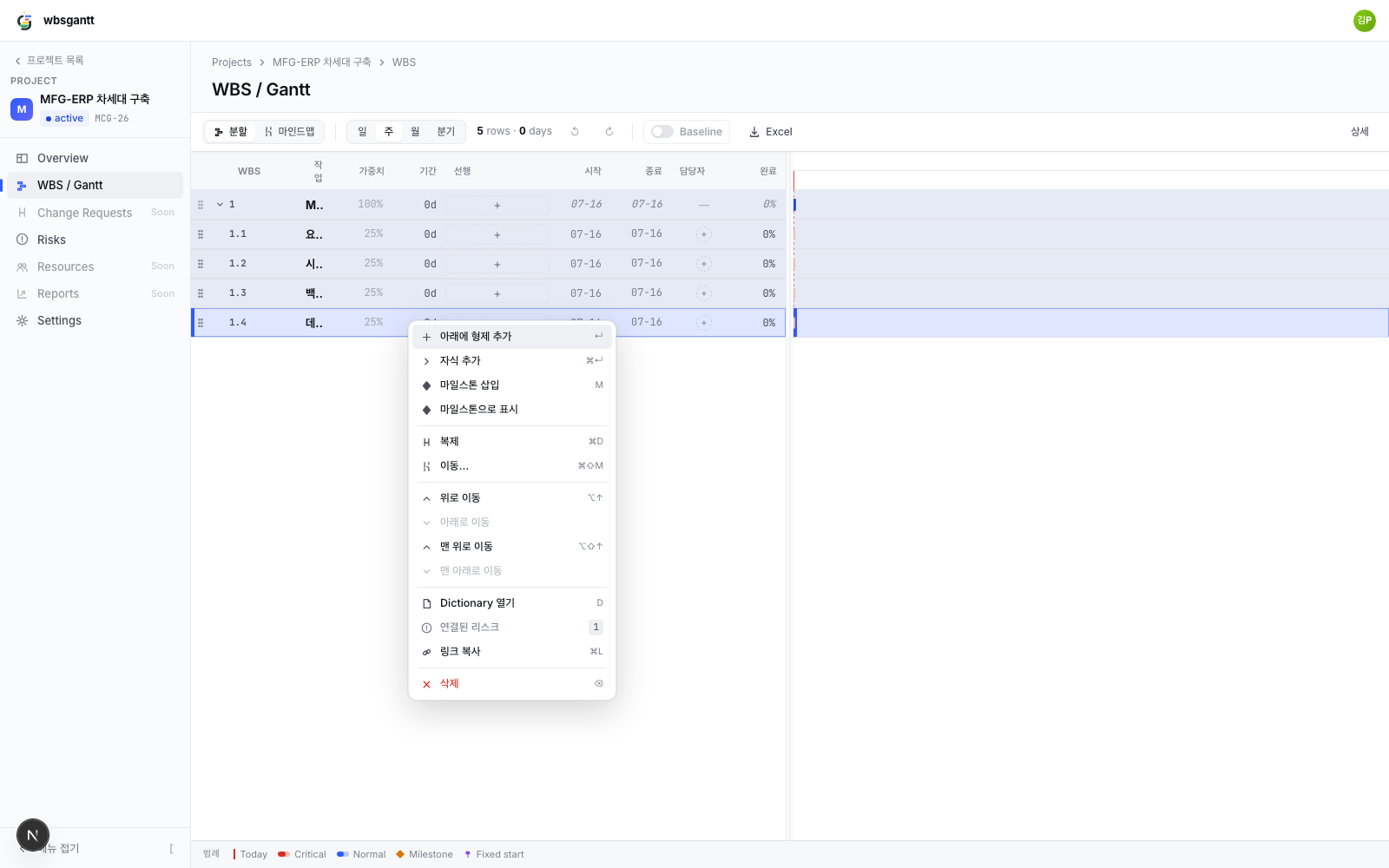
The effect of the link shows up on the other side. Go to the WBS screen, right-click the 1.4 Data migration row, and the context menu shows "Linked risks 1." Click it and you land on a risk view filtered to that node (/risks?node=). From Gantt to risk, from risk to Gantt — a round trip. The reason a risk log goes unopened after kickoff is that it's severed from the plan. When it's linked, the risk rides along every time you look at the work.
Operating cycle — the weekly review
A risk register earns its keep in monitoring, not in entry. We replayed a weekly review.
The first screen of the meeting is those four KPI cards. Open 7 · High 2 · Mitigating 2 · Overdue 1. "How many are live, how many are big, did we drop any" gets answered in one line. The Overdue 1 catches the eye immediately — the legacy-data-quality risk's 7/10 due date has passed. In the register table, that row's due date shows in red with a warning icon (⚠).
For risks we'd started responding to, we moved the status from identified to mitigating (developer attrition and legacy data, both). Test-environment provisioning delay, no longer a threat once handled, we dropped to closed — and since closed drops off the matrix, the next meeting's picture gets that much cleaner.
The node-filter view we arrived at from the WBS earns its keep here too. In the view carrying a "Filtering by: 1.4 Data migration" chip, the table narrows to the single row hanging off that node (Poor legacy data quality), and the matrix and KPIs recompute against that subset. A "just the risks on this work" meeting becomes possible.
Honestly — what it can't do
As case-study custom demands, we write down what it can't do, too.
- There's no Realized→Issue promotion. The status set includes realized, but there's no flow yet to promote a risk that actually materialized into an issue and track it separately. For now the status label is all there is.
- There's no risk heatmap report. The matrix lives on screen only. The Excel export (that feature from the Excel case study) has no risk sheet either — to attach a risk snapshot to an executive report, you still have to screenshot the screen.
- The 5×5 is a qualitative tool. Score is just the product of Probability × Impact, not a quantitative analysis like EMV (expected monetary value). "20 is three times riskier than 6" is not what it means; "look at 20 first" is. It doesn't cross that line.
- Categories are a fixed preset of four. Organizational, Technical, PM, External. Every organization has its own risk taxonomy, but there's no customizing it right now.
These are boundaries more than shortcomings. The last two especially — not mistaking a 5×5 for EMV, and living within four categories before expanding them — lean toward keeping the tool from standing in for judgment.
Closing
A risk log dies not out of laziness. It dies because it's severed from the plan. Living as a separate spreadsheet, it has no reason to be opened other than a meeting reminder.
One thing changed in this experiment: the risk lives on top of the plan. Identification as a coordinate in the New Risk dialog, assessment as priority in the 5×5 matrix, response as strategy/owner/due date, monitoring as KPI cards and status transitions — the risk process PMBOK splits into four steps folds into a single screen. And above all, because the risk hangs off a WBS node, the threat rides along every time you look at that work.
If the plan is a map of what to do (Part 1 was about the work you miss), the risk register is a map of where that map can tear. Part 3's argument was that when the baseline disappears you can't even tell you've slipped (Part 3) — and a risk is the same. Fail to write it down and link it, and only after it blows up does it become "we knew about that." What this tool erases isn't the effort of writing a risk down — it's the habit of writing it down and then forgetting it.