When Was This Deadline, Originally?
Right after a schedule revision, we replayed it in the change history — field-level old→new with who and when, and what never gets recorded.
There is a moment when every project meeting goes quiet. Someone points at a date on the screen and asks: "When was this deadline, originally?" Nobody answers with confidence. The Excel plan holds only the current value; the previous one vanished from the world the moment someone typed over it. People dig through chat logs, then last week's minutes, and eventually a sentence begins with "if I remember correctly…"
If that question sounds trivial, you've been lucky. On projects with a client attached, "justify the schedule change" is a recurring ceremony, and when an audit comes in, the when, who, and why have to exist on paper. If all the PM has at that point is an overwritten spreadsheet, justification becomes archaeology — excavating mail threads and meeting-minute strata to reassemble the fossil of a date.
In the previous installment we saw SPI 0.84 and fixed the schedule the same day. Extended a duration, cleaned up a name, assigned an owner, corrected a progress entry. This installment is the replay right after that adjustment session: can we retrace what we just changed from records instead of memory? As always — not an ad, a lab report. What gets recorded and what doesn't, written down as-is.
The setup — replaying what just happened
The stage is the same as last time — the 44-node ERP project in execution week 7, on a replica re-anchored to capture day (the MCG-26B code on screen, same disclosure as before). In the adjustment session we touched five things by hand:
| # | Target | Change |
|---|---|---|
| 1 | Open & stabilization phase | added a predecessor (FS) |
| 2 | Migration execution & verification | duration 7d → 10d |
| 3 | Same node | renamed, twice in a row |
| 4 | Accounting feature build | owner assigned |
| 5 | Legacy data cleansing | progress corrected 9% → 12% |
How these five landed on screen is the whole experiment.
"Excel has Track Changes," someone will say. It does — if it was turned on, if nobody clicked "accept all changes," and if the file never forked into final_edit_REALfinal_v3.xlsx. Shared-document history is something you enable, and enabling is what gets forgotten. What we're testing here is the opposite arrangement — history you cannot turn off, recording as the default state.
A node's history — old→new, who, when
The detail panel has two tabs: Details and Change history. Open the history tab on the migration verification node — the one whose duration we extended.
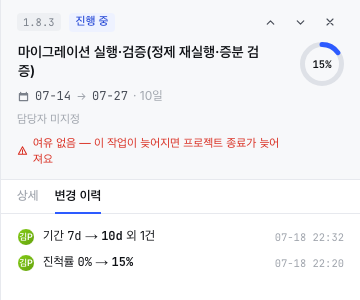
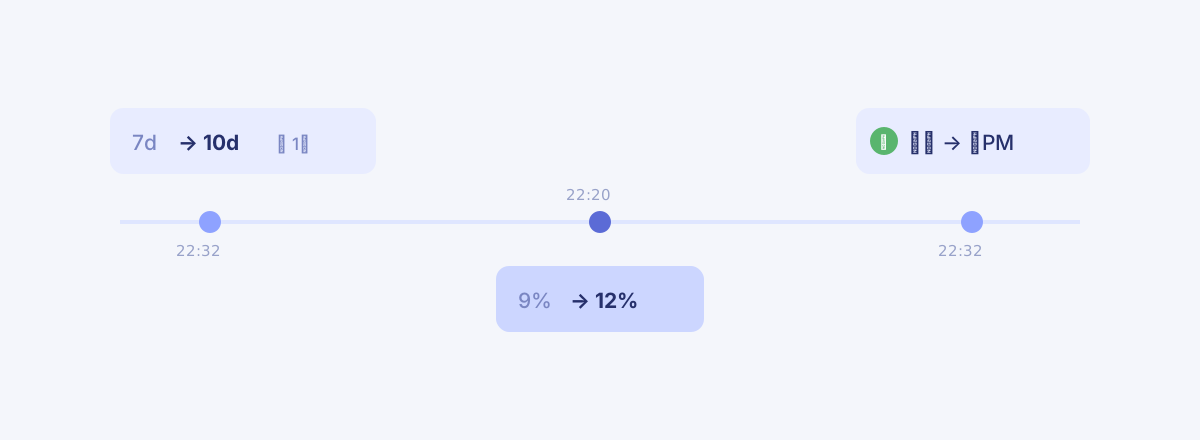
Each row is a sentence. Duration 7d → 10d and 1 more, by Kim PM, at 22:32. The old value gets a strikethrough; the new value stands in bold. Whoever wonders why the deadline is what it is now opens this tab instead of the minutes — it was 7 days, and the adjustment session made it 10. The lifespan of the question shrank to one click.
The "and 1 more" tail deserves a look too. After extending the duration we renamed the node twice in a row. If three edits became three rows, history would turn to noise fast. Consecutive edits to the same node merge into one row, and another edit slipping in between splits a new one. That's how the history stays a digest instead of a typing log.
The timestamps being absolute — not "3 days ago" — also matters for replay. The difference between "I changed it yesterday-ish" and "it was changed at 22:32" is the difference between before the meeting and after it. A day will come when that ordering assigns responsibility.
This demo was Kim PM alone, but the avatars earn their place the moment a plan has multiple hands on it. Once several people edit the same schedule, "who" stops being decoration — whether the client's manager moved that date or your team lead did changes what you do next. Each history row leading with a face is that question pre-answered.
The trail of a correction, the record of an assignment
The legacy data cleansing node shows a different pattern.
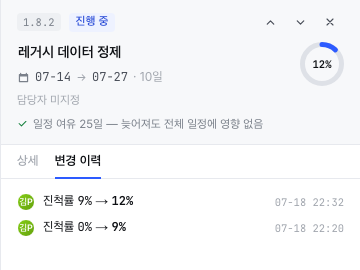
Progress 0% → 9% at 22:20, then 9% → 12% at 22:32. The first entry turned out to be off, so we corrected it — and the trail of the correction survived as two rows. In Excel, only the final 12% would remain, and the fact that "we originally reported 9%" would evaporate. For a number as report-adjacent as progress, the fact that it was corrected is as much information as the final value.
A surviving trail also lowers the cost of correcting. In tools where fixes leave no trace, teams sometimes drag a wrong number along because a correction might look like a cover-up. When the trace stays, proudly, the polarity flips — the 9-to-12 record reads not as concealment but as evidence of diligence. Half of honest progress, as Part 4 argued, is culture; culture grows out of small structures like this one.
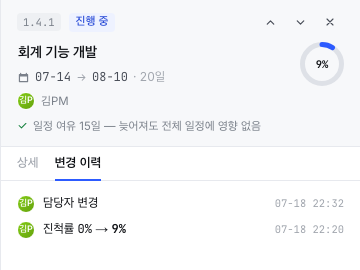
The accounting node we assigned an owner to got its row as well — owner changed, 22:32 — and Kim PM's avatar moved into the panel header.
The project's feed — the view from outside a node
For a single node, the panel is enough. But on a day like the adjustment session, when several nodes get touched at once, you want "what happened to this project today" in one column. That's the Recent activity card on Overview.
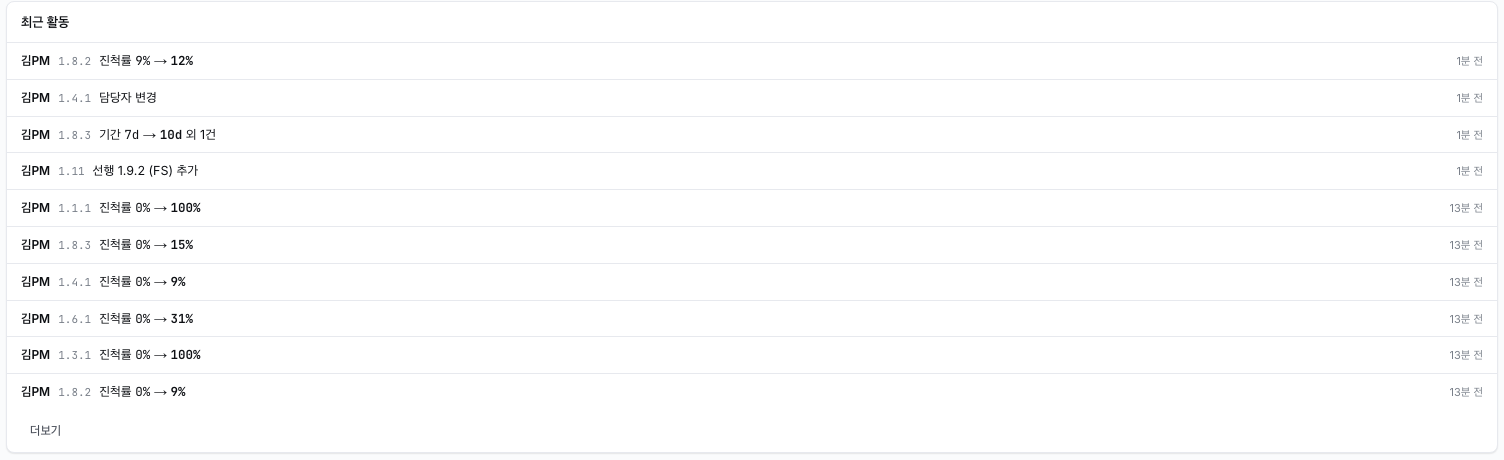
The four session entries sit at the top: the progress correction, the owner change, the duration extension, and predecessor 1.9.2 (FS) added — even drawing a new dependency line makes the feed. A history that only logged field edits would be half a history. What actually moves schedules is less often a date being typed and more often a line being drawn or erased, and the lines land here too.
Below them, the rows from 13 minutes earlier — the batch progress entry. 0% → 100%, 0% → 31%… one line per node. The record doesn't rank the edits: routine entry and a late-night hotfix carry the same weight. You skim the flow in the feed with its relative times ("1 min ago"), then drop into a node's panel tab for the absolute ones — a division of labor between the two screens.
The reference and the trail — and what is not recorded
Last installment's baseline and this installment's history are an easily confused pair. Their jobs differ. The baseline is the reference for "what was the plan" — one frozen snapshot — while the change history is the trail of "who touched what, when." Without the former you can't measure how far you've slipped; without the latter you can't find why something changed.
Add a third piece and the picture completes. Change control (CR·CCB), which Part 3 covered, is the procedure that approves changes; history is the record that observes them. History blocks nothing — it records the wrong edit as faithfully as the right one. Blocking belongs to permissions and change control; history's job is to never lie about what happened. Honest observation is what control has to stand on.
And this history has one deliberate blank. When we extended that duration by three days, CPM recalculated a chain of downstream dates — and none of those derived moves appear in any node's history. Only direct human edits are recorded. It looks like an omission at first, but it holds up: record the derivations and a single edit would dump dozens of rows, burying the human decision they came from. The consequence, though, is that "why did this date change?" sometimes has no answer in the history tab — the answer lives in the dependency lines and the Gantt. Knowing which screen answers which question is part of knowing the tool.
Honestly — what it doesn't do
Per this series' custom, the misses go on the record too.
- Merged rows don't expand. The changes folded into "and 1 more" — in our case, two renames — can't be inspected individually afterward. Merging cuts noise, but sometimes the noise is the evidence.
- Owner changes don't show values. Only the fact — "owner changed" — is displayed, not from whom to whom. Not yet enough for handover tracking.
- Derived changes are not recorded. Defended above as design intent, but it is a trade-off. The "why" of a CPM-moved date must be found in the dependency graph, not the history.
- No restore from history. It's read-only. Undo (⌘Z) lives only inside an editing session; there is no flow to click a history row and roll back to that point.
Closing
"Audit" is a grand word, but the everyday job of a change history is humble: removing the sentence that starts with "if I remember correctly" from meetings. When the original value, the person, and the time all exist, the memory contest is over. What's left to argue is "so what do we do next" — which is what the meeting was for anyway.
What this experiment checked was whether that humble job actually works. Of the session's five touches, five left a mark — four with values, one (the owner) as a bare fact. Not perfect; but the question that opened this piece now gets answered by the screen. It was 7 days. We made it 10 in the last adjustment. Right there, at that time.
The history answered "what changed." But the real mystery of that session is elsewhere: why did extending a task by three days eventually push the open date — and before that, why did it push nothing at all? The answer belongs to the lines. Next installment, we follow them.